Coast App Review: Is Recording Your Screen Every 2 Seconds Actually Useful?
A new category of desktop app showed up over the last year, and Coast is the cleanest example of it. The tagline is "fully local memory for you and your agents." In practice that means it screenshots your display every couple of seconds, runs OCR over each frame, indexes the text along with the app, window title and domain, and keeps all of it on your machine.
Then you, or more realistically your coding agent, can search that index.
We run a time tracker for a living, so this is adjacent to our world in an interesting way. We installed Coast, used it for a while, and came away with a split verdict: the engineering is genuinely good, and the core use case is much rarer than the pitch implies.
What Coast actually is
Worth being precise, because the marketing language ("memory") suggests something more conversational than what ships.
Coast is a local search index over screenshots. The pieces:
- Screenshots captured roughly every 2 seconds, stored on device
- OCR text extracted from each frame, in a full-text search index
- Metadata per frame: application bundle ID, web domain, window title
- Optionally, the macOS accessibility tree of the focused app
- A CLI at
~/.local/bin/coastthat queries all of the above
The CLI is the real interface. You get commands like coast query fts "<search>" for full-text search across OCR text, coast usage top-applications for screen time rankings, coast query sample --tr <timerange> for one representative frame per activity segment, and coast query image to pull a specific screenshot back out.
In the app itself, what you get is a search box and a grid of matching frames, filterable by application:
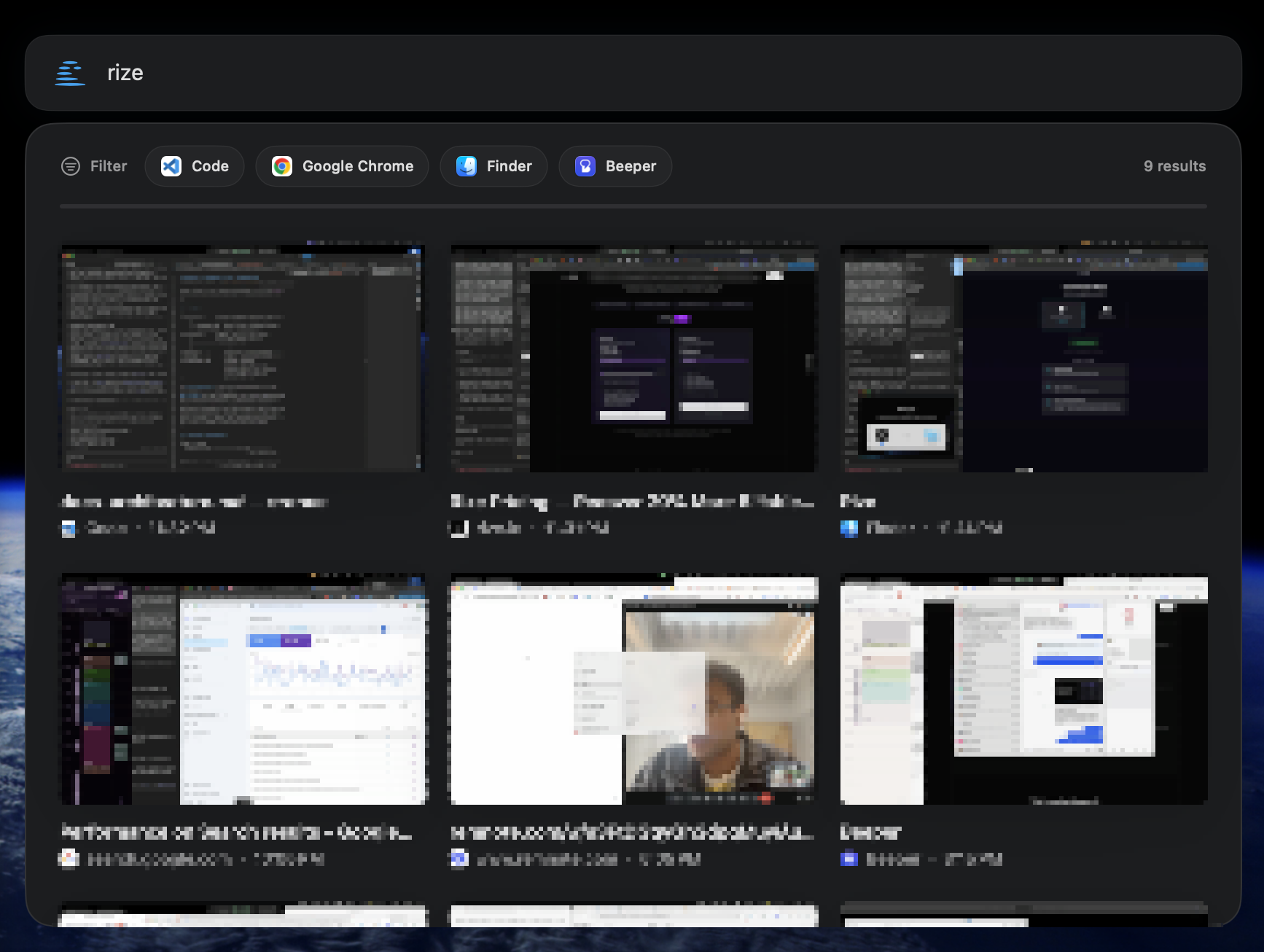
It is well built. The timerange syntax is sensible, the filters automatch (safari resolves to com.apple.safari), and the frame sampling is thoughtful about not drowning you in near-identical screenshots. Somebody who has actually thought about how an LLM consumes this data designed it.
The desktop app is beautiful, and the onboarding is one of the best first-run experiences we have seen in any app. The CLI is less polished and all the better for it: plain, simple, legible.
How much that matters is another question. A first run happens once.
The thing nobody says out loud: you cannot ask Coast anything
Here is the part that surprised us.
The product is pitched on questions like "what did I get done today?" That is a natural language question. You would reasonably assume you type it into Coast.
You cannot. Coast is not a chatbot. There is no prompt box that answers questions about your day.
What actually happens is that you open Claude Code, or Codex, or Cursor, and that agent shells out to the coast CLI, runs a handful of searches, reads the frames, and composes an answer. Coast supplies the index. The intelligence lives in a completely different application that you also have to have open.
Here is what that looks like in practice, asking for a day summary:
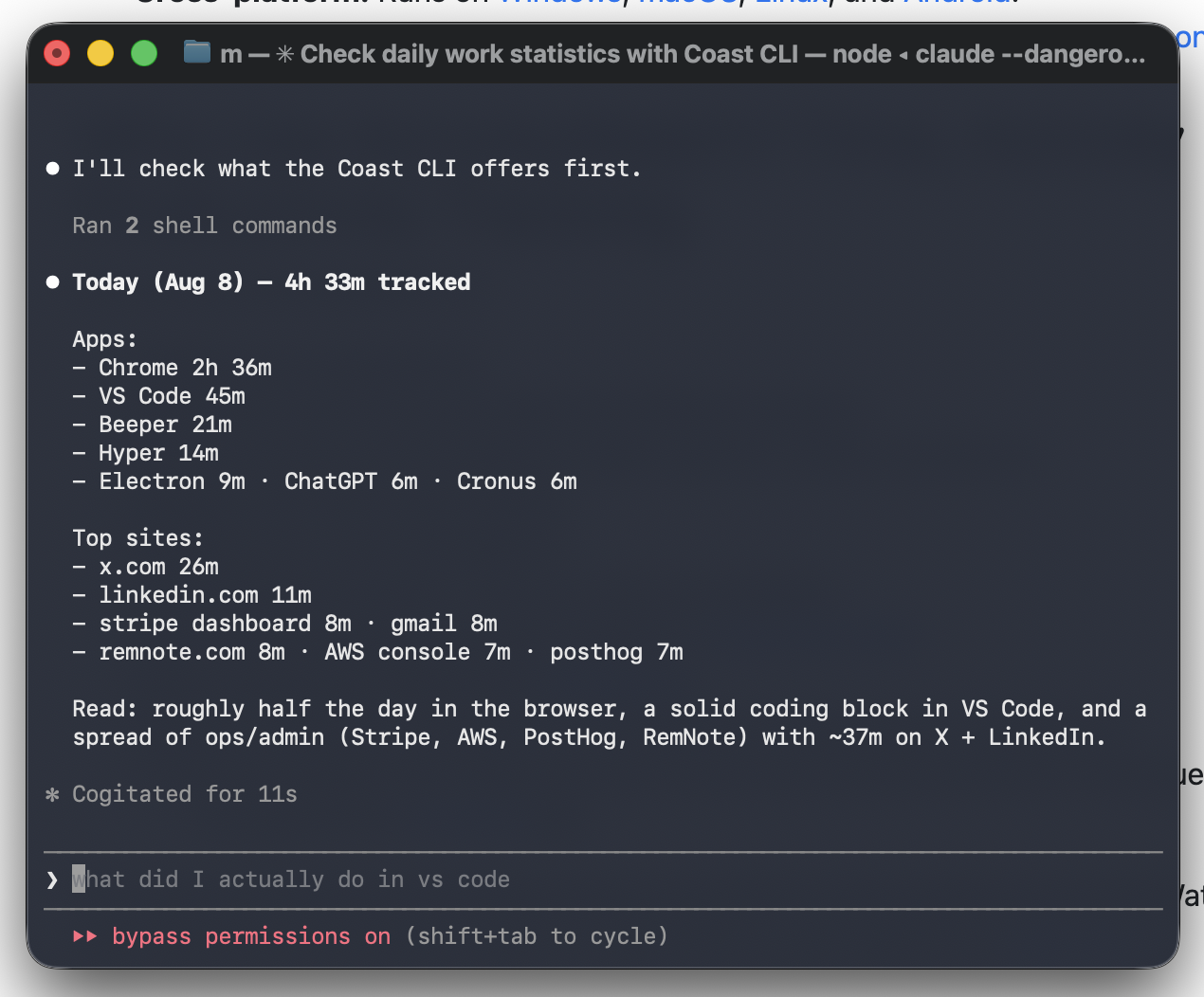
Two things worth noticing in that screenshot.
First, the interface for "what did I get done today" is a terminal, inside a coding agent, with bypass permissions on. That is a fine place for a developer to be. It is not a place most people are, and it is not the surface the product is marketed on.
Second, look at what comes back. Chrome 2h 36m, VS Code 45m, Beeper 21m. x.com 26m, linkedin.com 11m. That is an app-usage report. It is a time tracker, assembled on demand, out of a million screenshots, by a language model, in eleven seconds of thinking. And it is a less useful one than a purpose-built tracker gives you continuously, because "Chrome 2h 36m" is exactly the number that does not answer the question. Chrome doing what?
The agent even says as much in its summary: roughly half the day in the browser. That is the honest limit of app-level totals, and it is where a tool that understands what the window was showing starts to matter.
That is a defensible architecture. Keeping the index dumb and local while letting any agent query it is arguably the right layering, and it is why the CLI is as well-designed as it is. But it means the demo and the daily experience are different products. The demo shows a question being answered. The daily experience is remembering that a CLI exists, in a terminal, inside a coding tool, when you happen to want something out of it.
The deeper problem: recall demand is low
We have been running Coast for weeks. We have deliberately gone looking for reasons to query it. The honest count of times we needed it, unprompted, in the natural course of work: approximately zero.
This is not a knock on the implementation. It is a claim about the shape of the need.
"What was that thing I saw five days ago?" is a real question, and when you have it, it is genuinely painful. But it arrives rarely. Most of the time when you want to re-find something, you already know where it lives: it is in your browser history, your Slack, your email, your editor, your notes. Those tools all have search. Screen history is the fallback for the residual case where the thing left no trace anywhere else, which is a thin slice of a thin slice.
Compare that to the question a time tracker answers. "Where did my week go?" is not a question you have occasionally. It is a question you have every week, and one you cannot answer from any existing tool's search box, because no existing tool is measuring it. The demand is continuous rather than episodic.
This is the real distinction, and it is worth stating plainly:
Recall is on-demand and rare. Accounting is continuous and constant.
A screen recorder optimizes for recall: perfect fidelity, everything preserved, retrieved when summoned. A time tracker optimizes for accounting: heavy compression, almost nothing preserved, delivered whether you asked or not. They look similar from the outside because both watch your desktop. They are solving opposite problems.
Two very different privacy bargains
Both categories market themselves on privacy, and both are telling the truth, but about different things. It is worth understanding which trade you are making.
Coast's bargain: record everything, keep it local. Every screenshot, every OCR'd password field, every DM, every medical portal, every private window you had open, sitting on your disk. Nothing is transmitted. The protection is the boundary of your machine. That is a strong guarantee right up until the moment your laptop is stolen, compelled, backed up somewhere careless, or read by a piece of software you gave disk access to. You have created a perfect, searchable, indexed record of your entire digital life and the only thing standing between it and someone else is your device.
Our bargain at Cronus: record almost nothing, redact it before it leaves, and be honest that it leaves. Cronus never captures your screen. It reads app metadata through macOS accessibility permissions: the name of the app, the title of the window, the URL of the browser tab. Sensitive information is redacted on your device before anything is sent, so it never reaches our servers at all. What does get sent is categorized by an AI model, under GDPR. You can pause tracking whenever you want and revoke the accessibility permission at any time. It is all written down on the homepage and in our privacy policy.
Neither of these is unambiguously "more private," and anyone who tells you otherwise is selling something. Local-and-total means a catastrophic blast radius with a low probability. Remote-and-minimal means a small blast radius with a higher surface area. What we would say for our side of it: the worst-case disclosure from Cronus is a list of app names and window titles. The worst-case disclosure from a full screen recorder is everything you have looked at, with the text already extracted and indexed for whoever gets it.
If you install Coast, that is the specific thing to be deliberate about. Not "is it local" (it is), but "what have I now created, and who else can reach my disk."
Who is building this, and why
Coast comes from Attention Engineering, founded in 2025 by Aidan Guo and Julian Windeck. Guo left Carnegie Mellon at 19; Windeck has a Cambridge PhD with research stints at MIT and Berkeley. They raised a $1.25M pre-seed from Village Global and Liquid 2 Ventures, plus angels including Lukas Haas of Google DeepMind and the Interaction cofounders. Small team, roughly five people.
The company's stated direction is a desktop-native AI assistant that learns from your workflows and automates repetitive tasks. That is worth sitting with, because it reframes what Coast is.
To automate someone's workflow, you first need a corpus of that workflow. A free local recorder that captures every action a knowledge worker takes, on a machine you do not have to pay to store, is an efficient way to build the substrate for exactly that. We want to be clear this is our reading and not something the company has stated: the consumer app looks less like the destination and more like the groundwork, with the eventual business likely sitting upmarket where workflow automation gets sold by the seat.
That is a perfectly respectable strategy. It is just useful to know which product you are early to.
They are also not first. screenpipe has been doing open-source local screen and audio capture with agent integration for a while, and ActivityWatch has been doing local activity tracking without the screenshots for years. Coast's contribution is polish and a genuinely better CLI, not the idea.
Should you install it?
Install Coast if:
- You already live inside a coding agent all day, so the CLI is one sentence away rather than a context switch
- Your work involves genuinely losing things: research across dozens of tabs, reading you cannot re-find, debugging sessions you need to reconstruct
- You are comfortable with a complete indexed record of your screen existing on your disk
Skip it if:
- The question you actually have is "where did my time go," which it answers only crudely, through app-level totals
- You want an answer without opening a terminal
- You would not be comfortable with someone reading the index
What we took from it
The interesting part of Coast is not the feature. It is the assumption underneath it: that the useful unit of desktop memory is the frame, and that you make it useful by keeping all of them and searching later.
We think the useful unit is the interval, and that you make it useful by throwing nearly everything away at capture time and keeping only what the time meant. Cronus stores that you were in Coding from 09:00 to 09:12. It does not store what the code said. That compression is the whole product, not a limitation of it, because "where did my week go" is answerable from intervals and is not meaningfully more answerable from a million screenshots.
Both bets are reasonable. Coast's bet pays off if agents become good enough that raw recall becomes the bottleneck for automating your work. Ours pays off if what people actually want, week after week, is a straight answer about where their time went and a nudge when it is going somewhere they did not choose.
If that second one sounds more like your problem, Cronus is $6 a month after a 21-day trial and does not record your screen.
Have you found a use for screen-history search that we are missing? We would genuinely like to hear it, because we tried hard to find one.
